
For knowledge workers in SMEs
Your knowledge. Finally usable. For everyone.
amaiko makes company knowledge usable and takes work off your plate. Personal, adaptive and proactive.
Native integrations with Microsoft 365, Google Workspace and Box.
€41.58 per user/month, billed annually · Teams, Slack or browser · German hosting, 100% GDPR
See how it worksTrusted by innovative companies















Knowledge management
The knowledge is there. Nobody can find it.

Scattered
Knowledge sits in inboxes, drives, chats and people's heads.

Always hunted for
Anyone who needs something searches, asks around and waits for an answer.

Disconnected
What one project learned, the next one never hears about.

Tied to people
When someone is on holiday or gone, so is what they know.
amaiko turns it into knowledge everyone can use day to day, and keeps two things cleanly apart:

Shared knowledge
amaiko finds and connects what's in your systems, and only sees what each person is already allowed to see. Team knowledge stays in the team.

Your personal context
Your projects, customers and way of working are private by default. Anything shared company-wide is reviewed first.
From knowledge to work
She knows. And she pitches in.
amaiko turns knowledge into finished work, right where you already work.
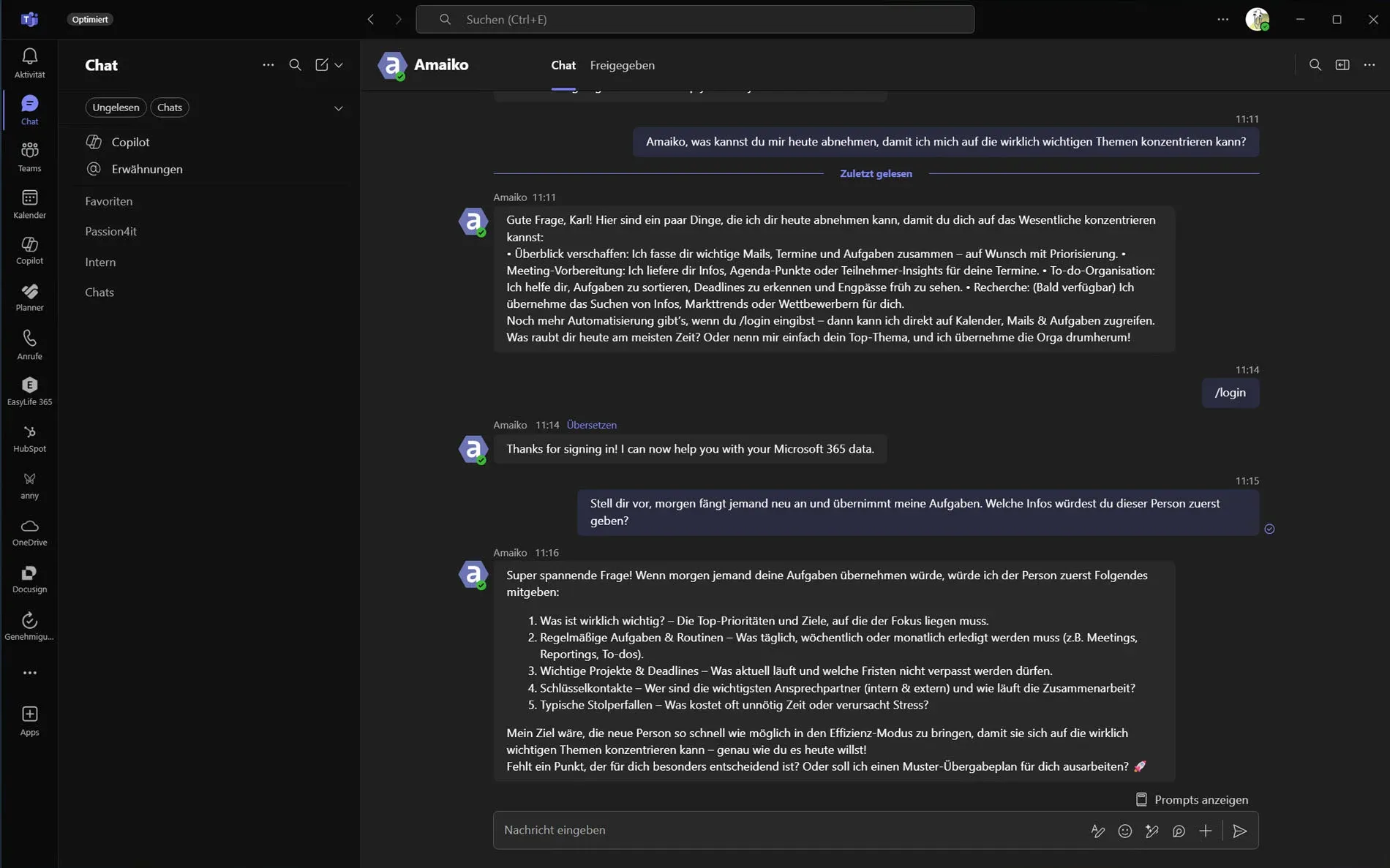
- 7:30 am Briefing in Teams Meetings, emails and tasks, pulled together from Outlook, HubSpot and Jira, and prioritized.
- 9:10 am Active Inbox Emails get sorted, flagged and turned into to-dos with deadlines. Right in Outlook, before you open them.
- 11:00 am Meeting amaiko listens in, writes the minutes, hands out the tasks, and reminds everyone next week.
- 2:00 pm Proposal, costing, presentation Word, Excel and PowerPoint as finished files in your corporate design, not as suggested text.
- 5:30 pm In the car Wrap up the day by voice. CarPlay or Apple Watch: the same colleague.
Set up in minutes, rolled out company-wide in hours. One customer was live across the company in 18 hours.
Personal. Knows your projects, customers and responsibilities.
Adaptive. Learns how you work. No prompt writing required.
Proactive. Speaks up on her own: the briefing before the meeting, the reminder about a promise.
Teams or Slack. Microsoft or Google. Or all of it.
Talk to amaiko where your team already talks, connect the workspace you run on, and add specialists for everything else.
Talk to her in
 Microsoft Teams
  Slack Web & desktop app iPhone & Android
 Connect your workspace
 Microsoft 365
 Mail, calendar, files, Teams chats, To Do and Planner.


 Google Workspace
 Gmail, Calendar, Drive, Docs, Forms, Meet, Contacts and Tasks.



 Box
Box Your files, with Box AI for answers straight from your documents.
Connect one, two or all three — she works across all of them at once.
Add-on specialists for the rest of your stack








...and custom integrations for your business
For tax firms: amaiko Kanzlei, with DATEV and Haufe, sealed for § 203 StGB
Explore all specialistsWhere amaiko comes from
Born in practice. Built with our customers.
amaiko grew out of real work: we developed it together with ten customers from retail, mechanical engineering, electrical engineering and legal services.
- Personal onboarding included We set amaiko up with you and stay with you through the first weeks.
- Monthly community calls Users swap use cases, and we show what's new.


What teams are saying

What matters most to us is that new solutions integrate cleanly into our existing system landscape. With amaiko, that's exactly what we have: a direct connection to our systems, meetings that are tracked and summarized in Microsoft Teams, and a central place where knowledge is permanently preserved. This lets us structure our daily work more efficiently and ensures that important information is never lost.

I travel a lot for sales and I'm not always in the loop on daily operations. amaiko's Active Inbox gives me full control regardless. It helps me cut through the noise and focus on what actually matters. Emails flagged by amaiko automatically turn into to-dos and become my first filter for priorities. Especially after being away, that's a real game changer.


amaiko helps us keep knowledge in one central place, follow up on meetings more efficiently and organize everyday tasks in Microsoft Teams far more easily. Integrating it into our existing system landscape was straightforward, and we saw the value quickly.


After a good 15 months of searching and refining in the AI space, we found amaiko for our company. Within 18 hours of setup, the system slotted into our existing system landscape noticeably better and more seamlessly. It also handled specific tasks more reliably than a pure ChatGPT solution. What convinces us most is the direct integration into Microsoft Teams: daily use enables standardised processes and brings far more structure to the company. amaiko works in a hands-on, practical way — and if an answer or function problem does come up, it's resolved quickly through the straightforward ticket system. That lets us work in a modern, reliable and fast way, and support our established processes sensibly with AI.

Security & data sovereignty
Hosted in Germany. Processed in the EU.
- Where does our data live?
- On servers in Germany. AI processing runs exclusively in the EU, GDPR-compliant and covered by a data processing agreement.
- Who gets to use which knowledge?
- Everyone sees only what they're already allowed to see in your systems. Personal stays private.
- And if it has to be even more sovereign?
- amaiko liberté uses Mistral models only, with every token processed in the EU. A permanent decision, not a setting.



Three offerings, one price
The right amaiko for you.

The personal AI for everyone on the team
amaiko
Knowledge, assistance and automations for every knowledge worker. With Microsoft 365, Google Workspace and Box.

The sovereign edition
amaiko liberté
The same AI, on Mistral models only, every token processed in the EU. For teams where data sovereignty is non-negotiable.

For tax firms
amaiko Kanzlei
A sealed tenant for German tax firms bound by professional secrecy under § 203 StGB: hosted in Germany, AI processing only in the EU.
DATEV Lohn and posting-batch uploads follow after DATEV's review.
One price, one budget.
All tokens included, within fair use. Fair-use limits and add-on packs are published on the pricing page.
amaiko is ready to start.
Morning briefings. Inbox triage. Knowledge that manages itself.
How much is busywork costing your team? Calculate your ROI