
Finished work.
Not just answers.

amaiko speaks up on her own, works directly in Outlook, HubSpot and Office, and remembers what your team knows. Ten situations from a working week, step by step.

A day with amaiko

One colleague. All day long.

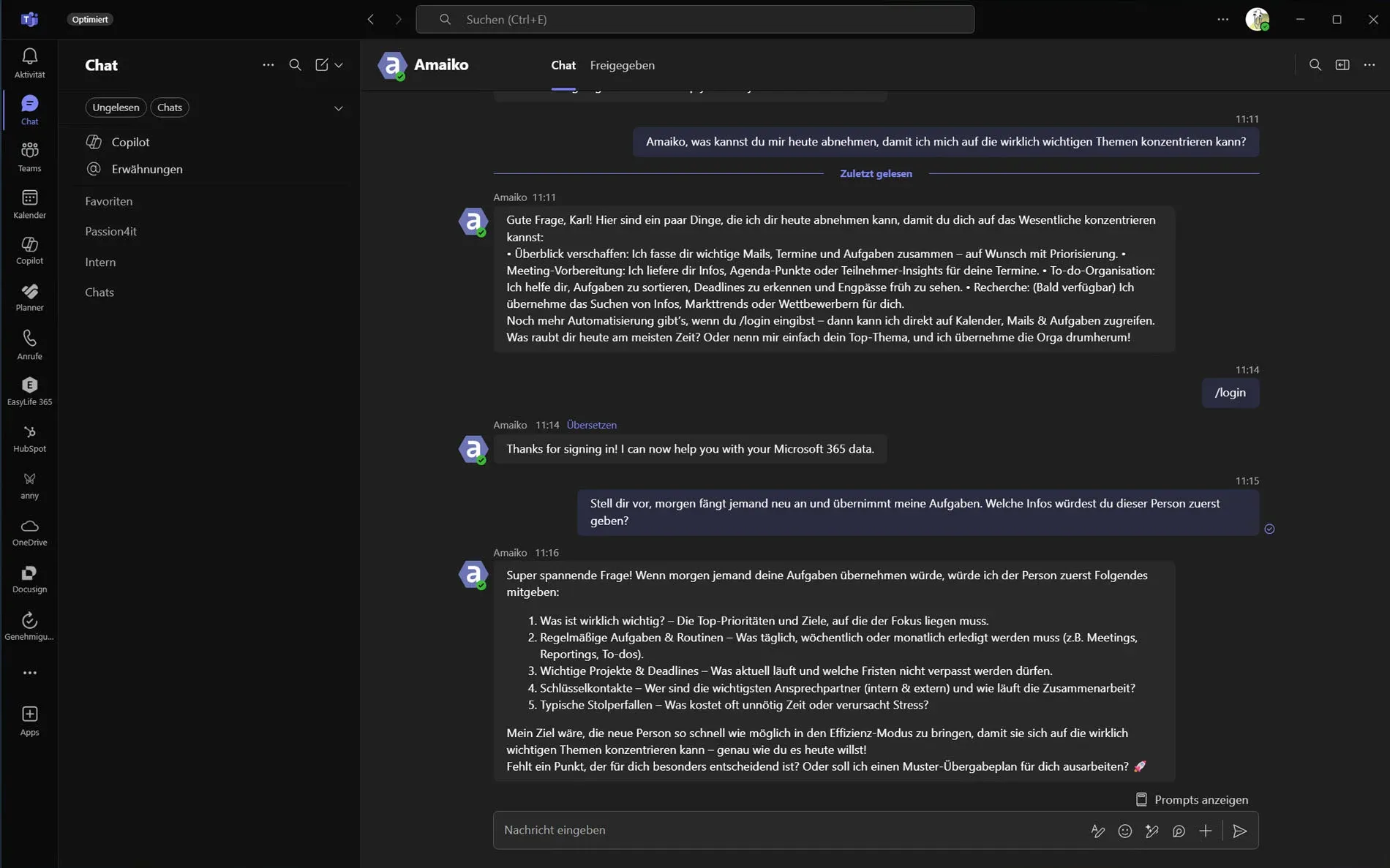
amaiko in a Microsoft Teams chat
  1. 7:30 am Briefing in Teams Meetings, emails and tasks, pulled together from Outlook, HubSpot and Jira, and prioritized.
  2. 9:10 am Active Inbox Emails get sorted, flagged and turned into to-dos with deadlines. Right in Outlook, before you open them.
  3. 11:00 am Meeting amaiko listens in, writes the minutes, hands out the tasks, and reminds everyone next week.
  4. 2:00 pm Proposal, costing, presentation Word, Excel and PowerPoint as finished files in your corporate design, not as suggested text.
  5. 5:30 pm In the car Wrap up the day by voice. CarPlay or Apple Watch: the same colleague.

Set up in minutes, rolled out company-wide in hours. One customer was live across the company in 18 hours.

On her own.

She doesn't wait for you to ask. Whatever is slipping, she brings back to you at the right moment, right in the chat.

Three days, no reply.

You send a quote, and then nothing. amaiko notices that nothing came back in the thread and reminds you after three working days. One click and she drafts the follow-up.

For sales, project leads, management

  1. Outlook

    Mon 16:40 You send Ms Huber the quote for the maintenance contract.

  2. Outlook

    Tue–Thu No reply comes back in the thread.

  3. amaiko

    Still open: no reply yet from Ms Huber on the maintenance contract quote (since Monday).

Before the customer arrives.

Fifteen minutes before every meeting with outside attendees, you know where things stand: what's open, what you still owe and who's new at the table. Pulled together from mail, earlier meetings and your notes on the contact.

For anyone with customer meetings

  1. Outlook

    13:45 Your calendar shows the annual review with Huber GmbH at 14:00.

  2. Outlook

    amaiko reads the mail thread and the notes from your last meeting.

  3. amaiko

    In 15 minutes: Huber GmbH. They've had the maintenance contract quote since Monday. Last time you promised a reference list, and it's still outstanding. New at the table: Mr Brandl from purchasing.

“Every Friday from now on.”

One sentence in the chat becomes a standing job. Every Friday amaiko checks HubSpot herself and sends you the result, and you never have to think about it again.

For sales reps and sales leads

  1. Microsoft Teams

    Wed 10:12 You write: “From now on, every Friday at 3 pm, send me my deals that haven't moved in two weeks.”

  2. HubSpot

    Fri 15:00 amaiko goes through your open deals in HubSpot.

  3. amaiko

    Four deals haven't moved in over two weeks. The longest: Huber GmbH, 23 days in “Quote sent”.

Inside your systems.

She reads and writes in Outlook, HubSpot, SharePoint and Office. What you get is finished work, not text to copy across.

One sentence, four systems.

No copying between windows. You say what you need, amaiko splits the work across her specialists and puts the result together.

For management, sales, assistants

  1. Microsoft Teams

    You write: “Who sent me this email? Look him up in HubSpot, write me a short memo and put it in my OneDrive.”

  2. Outlook

    amaiko reads the email in Outlook.

  3. HubSpot

    She finds the contact, the company and the open deal in HubSpot.

  4. Word

    She writes the memo as a Word document.

  5. OneDrive

    She files it in your OneDrive.

  6. amaiko

    The memo on Thomas Brandl, Huber GmbH, is in your OneDrive. In short: head of purchasing, customer since 2021, one open deal worth €48,000.

The quote is a file.

A calculation where the formulas hold up, and a deck in your company template. Built by specialists that actually produce Office files instead of describing them.

For sales and project leads

  1. SharePoint

    amaiko pulls the current price list from SharePoint.

  2. Excel

    She builds the calculation in Excel with real formulas: change the quantity and the sheet recalculates.

  3. PowerPoint

    She puts the deck into your PowerPoint template, logo and colours included.

  4. amaiko

    The calculation and the deck for Huber GmbH are ready. Both files are right here in the chat.

Calculated, not estimated.

Language models like to guess at numbers. amaiko calculates: every figure from your export comes out of real code, not a hunch.

For finance, management, sales leads

  1. Excel

    You drop the revenue export into the chat: 18,000 rows, three years.

  2. amaiko analyses it in Python, row by row.

  3. amaiko

    The ten customers with the steepest drop on last year, with revenue and difference. Biggest outlier: customer 1047, down 62 percent.

With a memory.

She remembers what happens in your company and who promised what. And it stays, even when people leave.

The new hire asks. amaiko knows.

Anything explained to amaiko once, she records overnight as company knowledge. Processes become visible to everyone; personal matters stay private.

For team leads, HR and every new starter

  1. Microsoft Teams

    March Thomas explains to amaiko how you bill travel time on maintenance jobs.

  2. Overnight, amaiko records it as a process for the whole company.

  3. Microsoft Teams

    June Lea, one week into the job, asks: “How do I bill the drive out to a customer?”

  4. amaiko

    Driving counts as working time, from head office, booked to the job. Breaks over 30 minutes come off. That's how you settled it in March.

A promise is a promise.

When someone promises you something by email, amaiko remembers it along with the deadline. If nothing arrives by then, she reminds you. If the answer comes, the item closes itself.

For anyone waiting on others

  1. Outlook

    Tue Mr Maier writes: “You'll have the Q3 figures by Friday.”

  2. amaiko notes the promise and the deadline.

  3. Outlook

    Fri Friday comes, and nothing arrives.

  4. amaiko

    Mr Maier promised you: the Q3 figures (by Friday).

Wherever you are.

In the meeting, in the car, on your wrist. The same colleague everywhere, one who knows your mail, your calendar and your customers.

Said in the meeting, done afterwards.

Just address amaiko by name in the meeting. Whatever you ask of her, she works through once the meeting ends. Emails only go out once you approve them.

For anyone who spends the day in meetings

  1. Microsoft Teams

    11:20 You say on the call: “amaiko, send Ms Huber last week's presentation.”

  2. SharePoint

    12:05 After the meeting, amaiko finds the presentation in SharePoint.

  3. Outlook

    She drafts the email to Ms Huber with the presentation.

  4. amaiko

    From the meeting “Huber annual review”: the email to Ms Huber is ready. Shall I send it?

On the way home.

Through CarPlay or on your Apple Watch you ask what's coming up and hand off replies. Hands on the wheel, eyes on the road.

For anyone who's on the road a lot

  1. 17:40 On the motorway you ask through CarPlay: “What's first thing tomorrow?”

  2. Outlook

    amaiko checks your calendar and your mail.

  3. amaiko

    8:30, Huber GmbH. The notes from last time are in the chat. And Mr Maier has sent the quarterly figures.

How to start.

  1. 1

    Install

    From the store into Teams in a few minutes. No IT project, no training.

  2. 2

    Connect

    Outlook, your calendar and Teams work straight away. You connect HubSpot, Jira or Personio right in the chat.

  3. 3

    Get going

    Write to her like you would to a colleague. Your first morning briefing arrives on its own the next working day.

Try it on your own inbox.

14 days free, set up in minutes.

No Microsoft 365? Start the trial with your company email

Hosted in Germany, GDPR-compliant. More on security